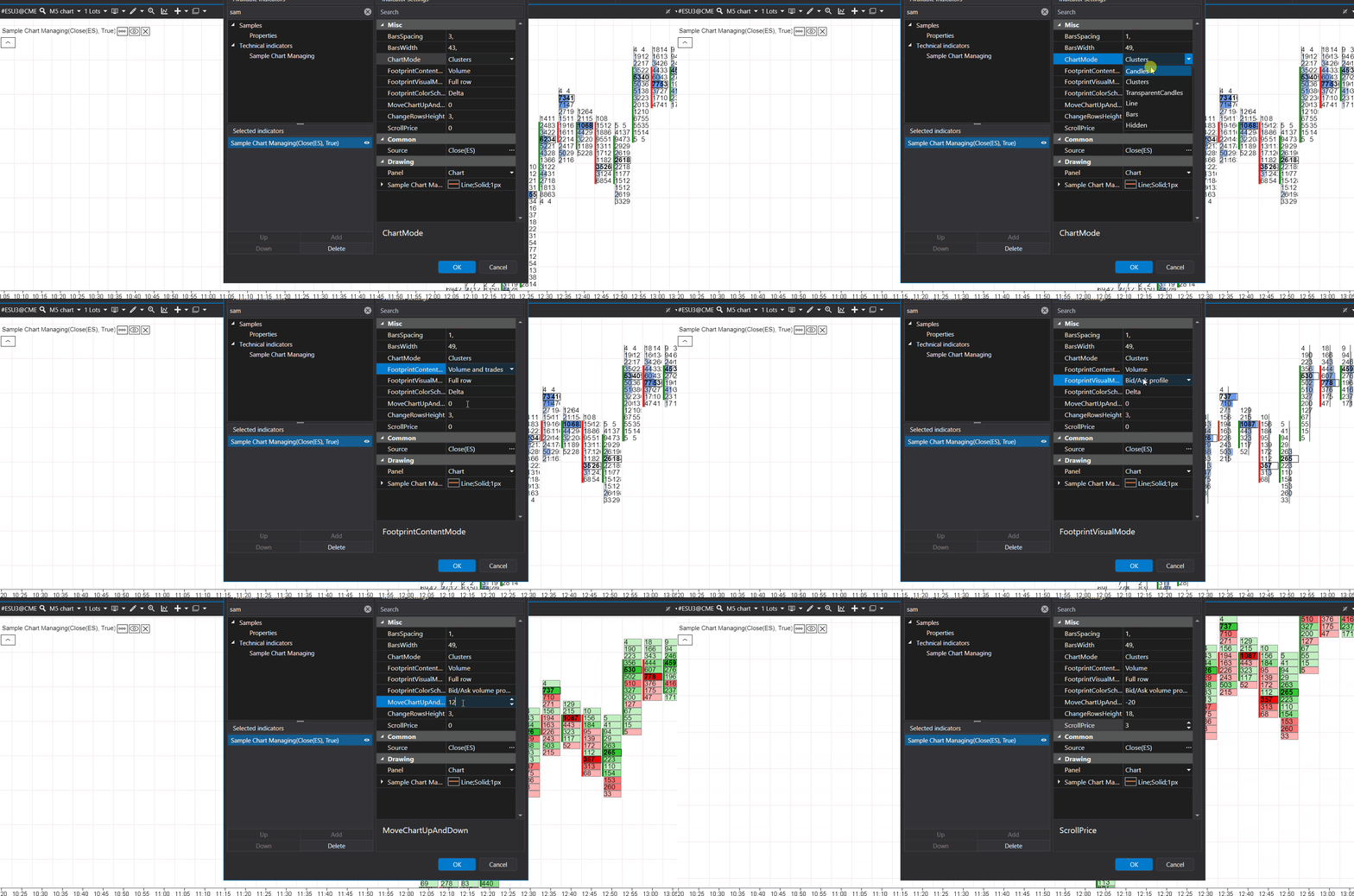
Managing the chart
Besides the chart settings menu, the chart can be controlled from an indicator: a setting of the indicator changes the spacing of the bars, the chart type or the footprint mode, or scrolls the chart. These methods and properties change the chart the user works with, not only the indicator.
The chart is reached through ChartInfo:
- ChartVisualMode: the chart type, readable and writable.
- FootprintContentMode: the text content of the footprint cells.
- FootprintVisualMode: the footprint visualization (histograms, bid and ask cells and so on).
- FootprintColorScheme: the color scheme of the footprint.
- PriceChartContainer:
- SetCustomBarsSpacing(decimal? value) sets the
distance between the bars;
nullreturns the automatic spacing. - SetCustomBarsWidth(decimal value, bool freezeValue)
sets the bar width. With
freezeValue = truethe width is fixed and the user cannot change it from the chart; withfalsethe width is set once and the user can change it as usual, and a width fixed earlier is released. The bar width has no automatic mode, so to release a fixed width, pass the current width (PriceChartContainer.BarsWidth) withfalse.
- SetCustomBarsSpacing(decimal? value) sets the
distance between the bars;
- CoordinatesManager:
- MoveChartUpAndDown(int offset) shifts the chart vertically by the given number of pixels, as if the user dragged it: a positive offset moves the chart down, a negative one up.
- EnableAutoScale() enables the automatic scaling.
- ScrollPrice(int ticksCount) scrolls the chart along the price axis by the given number of price levels and disables the automatic scaling. A positive value shifts the visible price range up, so the chart moves down; a negative value moves the chart up.
ChangeRowsHeightis obsolete and has no effect.
Example
Every setting of the indicator below applies its value to the chart at once. OnDispose returns the automatic bar
spacing and releases the bar width when the indicator is removed.
using System.ComponentModel.DataAnnotations;

using ATAS.Indicators;

namespace ATAS.Docs.Samples.ChartIndicators;

public class ChartManagingIndicator : Indicator
{
    private decimal _barsSpacing = 1;
    private decimal _barsWidth = 1;
    private ChartVisualModes _modes;
    private FootprintVisualModes _visualMode;
    private FootprintContentModes _contentMode;
    private FootprintColorSchemes _colorScheme;
    private int _moveChartUpAndDown;
    private int _scrollPrice;

    [Range(1, 1000)]
    public decimal BarsSpacing
    {
        get => _barsSpacing;
        set
        {
            _barsSpacing = value;
            ChartInfo?.PriceChartContainer?.SetCustomBarsSpacing(_barsSpacing);
            RedrawChart();
        }
    }

    [Range(1, 1000)]
    public decimal BarsWidth
    {
        get => _barsWidth;
        set
        {
            _barsWidth = value;
            ChartInfo?.PriceChartContainer?.SetCustomBarsWidth(_barsWidth, false);
            RedrawChart();
        }
    }

    public ChartVisualModes ChartMode
    {
        get => _modes;
        set
        {
            _modes = value;

            if (ChartInfo != null)
                ChartInfo.ChartVisualMode = value;

            RedrawChart();
        }
    }

    public FootprintContentModes FootprintContentMode
    {
        get => _contentMode;
        set
        {
            _contentMode = value;

            if (ChartInfo != null)
                ChartInfo.FootprintContentMode = value;
        }
    }

    public FootprintVisualModes FootprintVisualMode
    {
        get => _visualMode;
        set
        {
            _visualMode = value;

            if (ChartInfo != null)
                ChartInfo.FootprintVisualMode = value;
        }
    }

    public FootprintColorSchemes FootprintColorScheme
    {
        get => _colorScheme;
        set
        {
            _colorScheme = value;

            if (ChartInfo != null)
                ChartInfo.FootprintColorScheme = value;
        }
    }

    public int MoveChartUpAndDown
    {
        get => _moveChartUpAndDown;
        set
        {
            // A positive offset moves the chart down, so the sign is inverted:
            // increasing this property moves the chart up.
            var diff = _moveChartUpAndDown - value;
            ChartInfo?.CoordinatesManager?.MoveChartUpAndDown(diff);
            _moveChartUpAndDown = value;
        }
    }

    public int ScrollPrice
    {
        get => _scrollPrice;
        set
        {
            // A positive ticks count moves the chart down, so the sign is inverted:
            // increasing this property moves the chart up.
            var diff = _scrollPrice - value;
            ChartInfo?.CoordinatesManager?.ScrollPrice(diff);
            _scrollPrice = value;
        }
    }

    protected override void OnCalculate(int bar, decimal value)
    {
    }

    protected override void OnDispose()
    {
        // Return the automatic bar spacing
        ChartInfo?.PriceChartContainer?.SetCustomBarsSpacing(null);

        // Bar width has no automatic mode: keep the current width and let the user change it again
        ChartInfo?.PriceChartContainer?.SetCustomBarsWidth(ChartInfo.PriceChartContainer.BarsWidth, false);
    }
}