Drawing
An extension draws on the chart, in a column or in a module through the same API: an OnRender override receives a
RenderContext and draws with GDI+-like calls. This article shows it for a
chart indicator; the columns and modules articles describe when their OnRender is called.
OnRender and the layouts
Override OnRender and set
EnableCustomDrawing to true, otherwise the method is
not called. Then choose the layouts to draw on with
SubscribeToDrawingEvents, passing the
DrawingLayouts flags:
Historical: drawn on every new candle, on scrolling and on zooming;LatestBar: drawn when the last bar changes, as a rule on every tick;Final: the last layer, drawn on every chart repaint, for example on every mouse move;None: nothing is drawn.
Without the call the indicator is drawn only when the last bar changes. OnRender receives the context and the
layout being drawn, so one method can draw different things on different layouts:
SubscribeToDrawingEvents(DrawingLayouts.Final | DrawingLayouts.LatestBar);
RenderContext
The context takes colors as System.Drawing.Color, pens and fonts as RenderPen and RenderFont (namespace
OFT.Rendering.Tools); RenderPens holds ready-made pens of the standard colors.
using System.Drawing;

using ATAS.Indicators;
using OFT.Rendering.Context;
using OFT.Rendering.Tools;

namespace ATAS.Docs.Samples.CommonApi;

public class RenderContextIndicator : Indicator
{
    private readonly RenderFont _font = new("Arial", 15);
    private readonly RenderPen _ellipsePen = new(Color.Bisque);

    public RenderContextIndicator()
    {
        EnableCustomDrawing = true;
        SubscribeToDrawingEvents(DrawingLayouts.Final);
    }

    protected override void OnCalculate(int bar, decimal value)
    {
    }

    protected override void OnRender(RenderContext context, DrawingLayouts layout)
    {
        // A rectangle (width 100, height 200) from the point (5, 10)
        context.DrawRectangle(RenderPens.Blue, new Rectangle(5, 10, 100, 200));

        // A filled rectangle (100 x 100) from the point (0, 0)
        context.FillRectangle(Color.DarkSalmon, new Rectangle(0, 0, 100, 100));

        // A line from (10, 20) to (50, 60)
        context.DrawLine(RenderPens.AliceBlue, 10, 20, 50, 60);

        // A string at (50, 60)
        context.DrawString("Sample string", _font, Color.Black, 50, 60);

        // An ellipse inside a rectangle
        context.DrawEllipse(_ellipsePen, new Rectangle(10, 10, 100, 100));
    }
}
Create pens and fonts once, in fields, and reuse them: OnRender is called very often, especially on the Final
layout (see Performance).
Coordinates
The origin is the upper-left corner of the chart; X grows to the right, Y grows down.
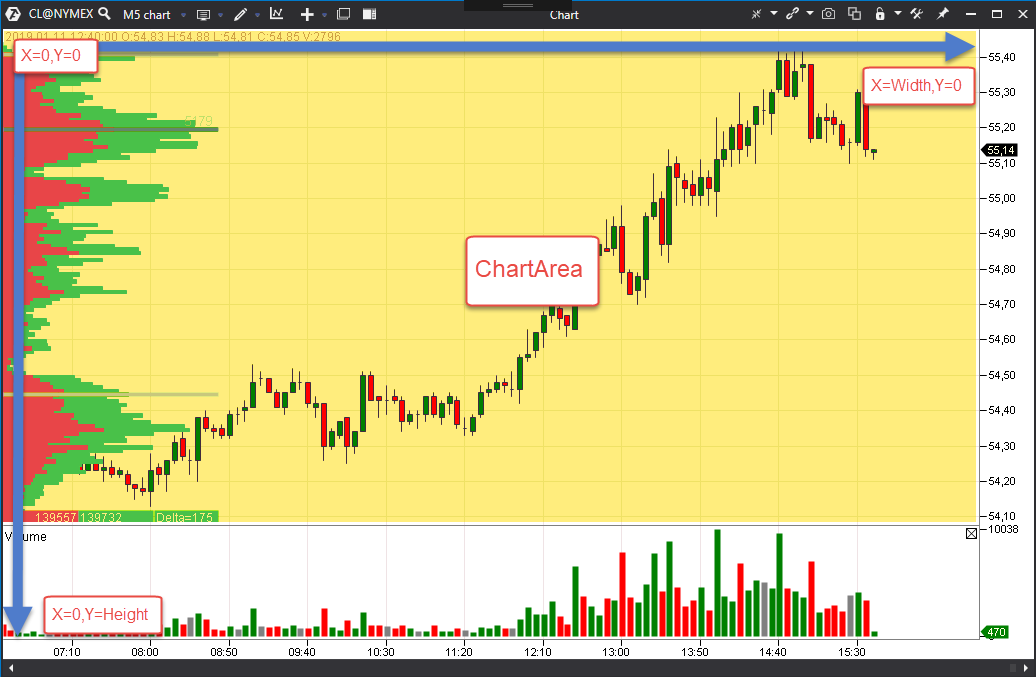
- Container of the indicator holds the area of its panel
(Region);
ChartArea is the area of the whole chart
(
ChartInfo.ChartContainer.Region),ChartInfo.PriceChartContainer.Regionthe price chart area. - ChartInfo converts between bars, prices and pixels: GetXByBar(bar, isStartOfBar) returns the X of the start or of the middle of a bar, GetYByPrice(price, isStartOnPriceLevel) the Y of the start or of the middle of a price level.
- MouseLocationInfo (
ChartInfo.MouseLocationInfo) is the mouse position and the bar below it.
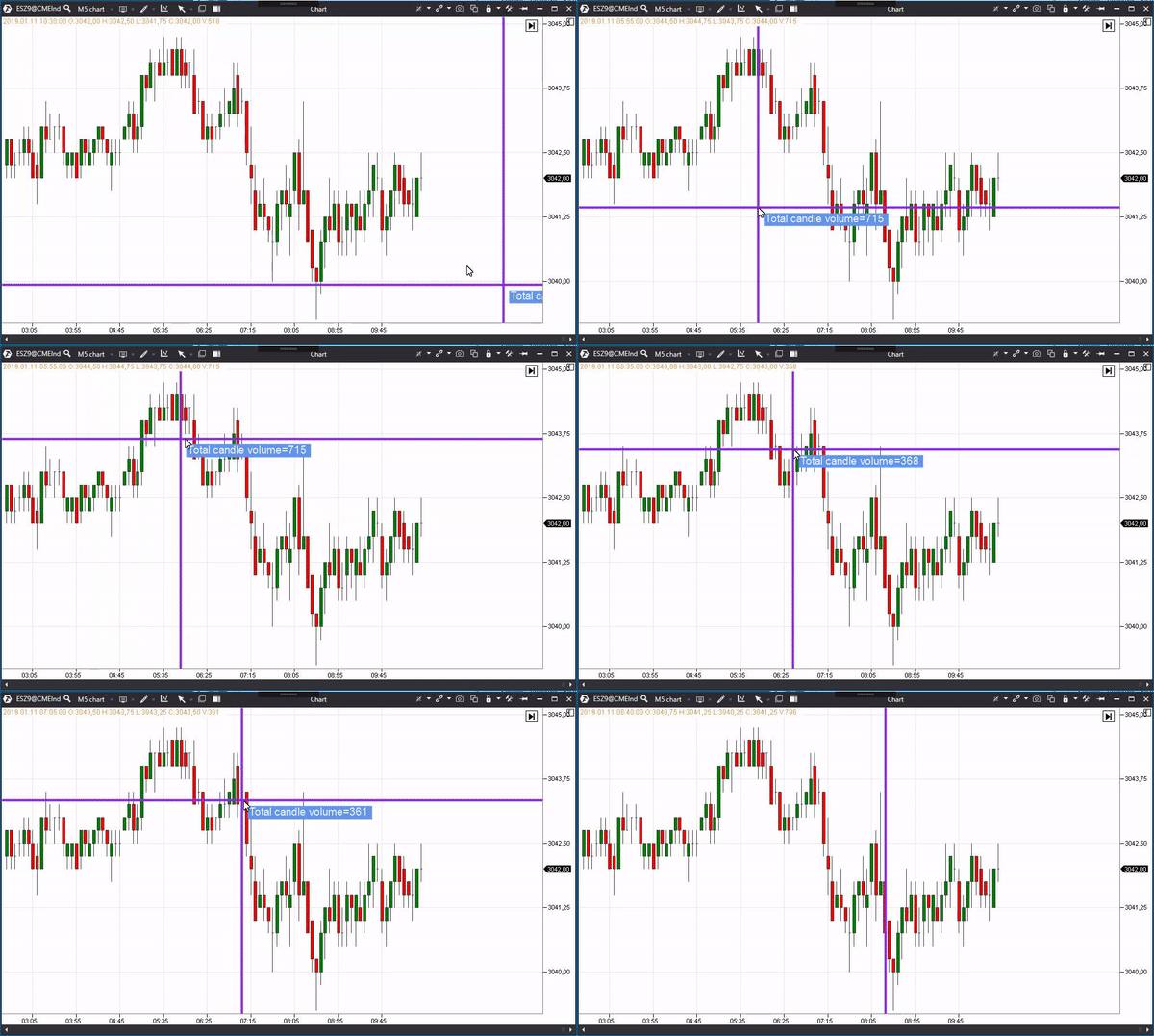
A crosshair at the mouse position with the volume of the bar under it:
using System.Drawing;

using ATAS.Indicators;
using OFT.Rendering.Context;
using OFT.Rendering.Tools;

namespace ATAS.Docs.Samples.CommonApi;

public class CrosshairVolumeIndicator : Indicator
{
    // Pens and fonts are created once, not on every frame
    private readonly RenderPen _pen = new(Color.BlueViolet, 4);
    private readonly RenderFont _font = new("Arial", 14);

    public CrosshairVolumeIndicator()
    {
        EnableCustomDrawing = true;

        // The Final layout only: redrawn on every chart repaint, including mouse movement
        SubscribeToDrawingEvents(DrawingLayouts.Final);
    }

    protected override void OnCalculate(int bar, decimal value)
    {
    }

    protected override void OnRender(RenderContext context, DrawingLayouts layout)
    {
        // The horizontal line
        context.DrawLine(_pen, 0, MouseLocationInfo.LastPosition.Y, ChartArea.Width, MouseLocationInfo.LastPosition.Y);

        // The vertical line
        context.DrawLine(_pen, MouseLocationInfo.LastPosition.X, 0, MouseLocationInfo.LastPosition.X, ChartArea.Height);

        var candle = GetCandle(MouseLocationInfo.BarBelowMouse);

        if (candle != null)
        {
            var text = $"Total candle volume={candle.Volume}";
            var textSize = context.MeasureString(text, _font);
            var textRectangle = new Rectangle(MouseLocationInfo.LastPosition.X + 10, MouseLocationInfo.LastPosition.Y + 10, (int)textSize.Width, (int)textSize.Height);

            context.FillRectangle(Color.CornflowerBlue, textRectangle);
            context.DrawString(text, _font, Color.AliceBlue, textRectangle);
        }
    }
}
Above or below the chart
DrawAbovePrice chooses whether the indicator is drawn above
the price chart (true) or below it.
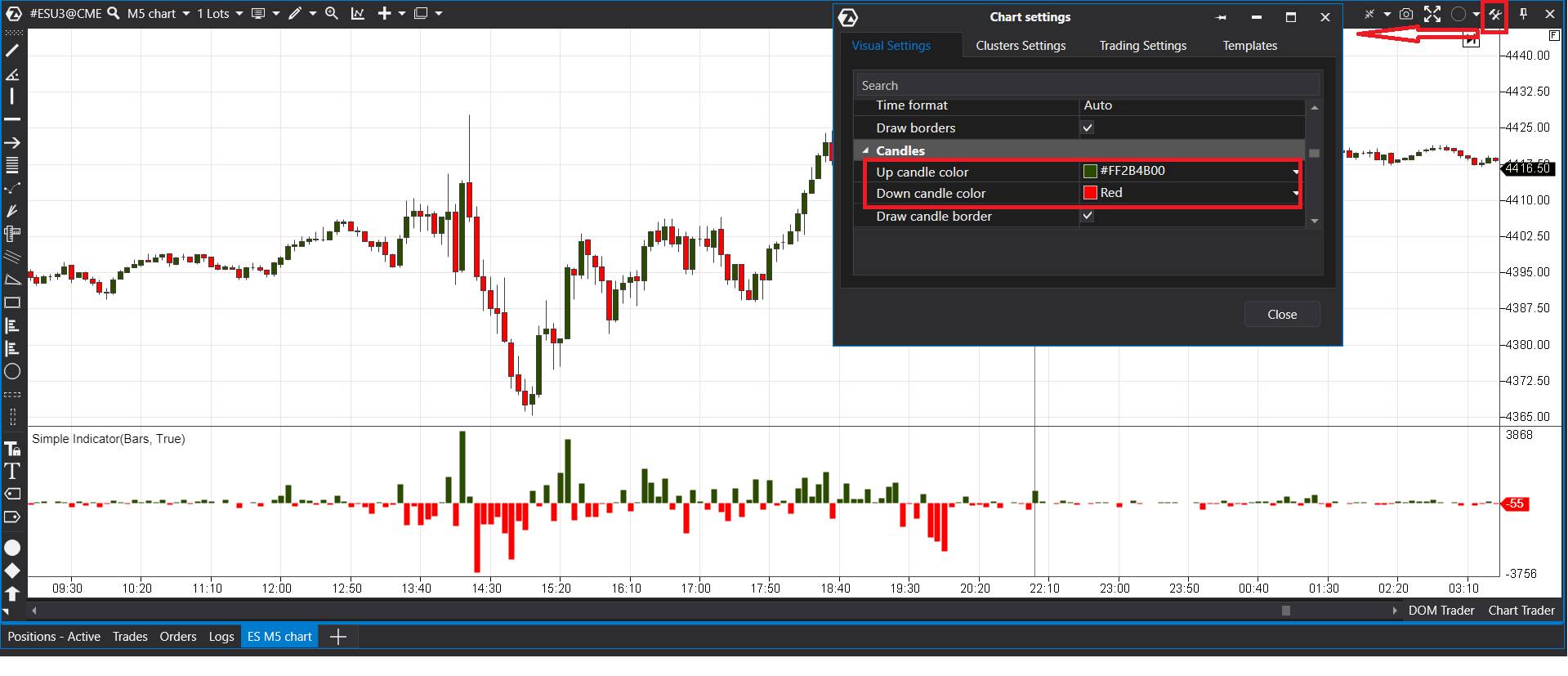
The colors of the chart settings
To keep the drawing consistent with the chart the user has set up, take the colors from
ColorsStore of ChartInfo instead of choosing your own: the up and down
candle colors, the background and the others. They are System.Drawing.Color, as are the per-bar colors of a data
series (Colors[bar]). A delta histogram in the candle colors of the chart:
using ATAS.Indicators;

namespace ATAS.Docs.Samples.ChartIndicators;

public class DeltaHistogramIndicator : Indicator
{
    public DeltaHistogramIndicator() : base(true)
    {
        Panel = IndicatorDataProvider.NewPanel;
        DataSeries[0].IsHidden = true;
        ((ValueDataSeries)DataSeries[0]).VisualType = VisualMode.Histogram;
    }

    protected override void OnCalculate(int bar, decimal value)
    {
        var candle = GetCandle(bar);
        DataSeries[0][bar] = candle.Delta;

        if (ChartInfo is not null)
        {
            ((ValueDataSeries)DataSeries[0]).Colors[bar] = candle.Delta < 0
                ? ChartInfo.ColorsStore.DownCandleColor
                : ChartInfo.ColorsStore.UpCandleColor;
        }
    }
}
ATAS X
Everything drawn through RenderContext works the same in the classic ATAS and in ATAS X. Do not use WPF brushes
(System.Windows.Media.SolidColorBrush) or other Windows-only UI types: they are not converted, and ATAS X does not
load the assembly (see Project setup). For text,
prefer the font of the chart, ChartInfo.PriceAxisFont (a RenderFont) or its FontFamily, so that the text is
rendered with a font the platform provides on the current OS; a RenderFont created by name should use a font that
exists on both Windows and macOS, such as Arial.