Metadata and conventions
How an indicator presents itself in the platform: its name in the list of indicators and on the chart, its group in the list, the About tab of its settings window and its default panel; and the conventions the platform relies on when it saves and loads the indicator.
Name, description and help link
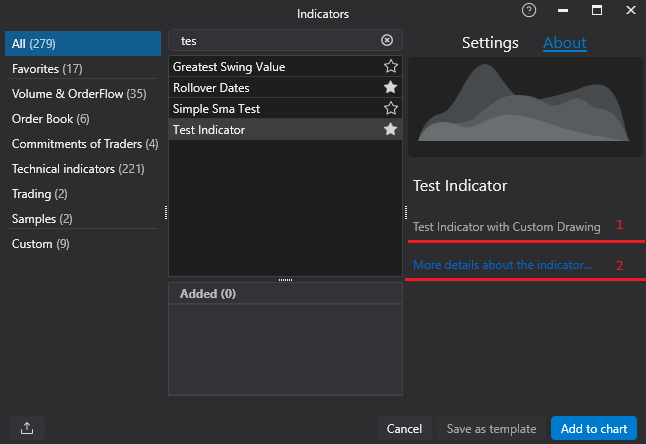
[DisplayName](System.ComponentModel) on the class: the name in the list of indicators and in the chart legend. Without it the class name is shown.[Display(Description = ...)](System.ComponentModel.DataAnnotations) on the class: the description on the About tab of the settings window.- [HelpLink] (
OFT.Attributes): a link to a page about the indicator, shown on the same tab.
[DisplayName("Metadata sample")]
[Display(Description = "Shows how an indicator describes itself: the name, the description and the help link.")]
[HelpLink("https://docs.atas.net/")]
public class IndicatorMetadataIndicator : Indicator
Names that collide. When the name of your indicator equals the name of another indicator, built-in or from
another DLL, the platform adds the name of your assembly in brackets, both in the list and on the chart:
Delta (MyIndicators). Both indicators stay available. The user can also give every instance a name of their own
on the chart; that name is not yours to set.
Group in the list of indicators
Indicators loaded from your own library are listed in the Custom group, whatever [Category] they declare.
The exception is an indicator of a module the platform installed from the Personal Area (see
Distribution). Such an indicator may go to one of the catalog groups with a
[Category] attribute (System.ComponentModel) declared directly on the class (an attribute inherited from a
base class does not count), and it may ask to be added to the user's favorites once, with
[FavoriteByDefault]:
// Both attributes take effect only for a module the platform installed from the Personal Area;
// an indicator loaded from a DLL copied by hand stays in the Custom group without a star
[DisplayName("Order flow pressure")]
[Category(IndicatorCategories.VolumeOrderFlow)]
[FavoriteByDefault]
public class ModuleCategoryIndicator : Indicator
The accepted groups are the constants of IndicatorCategories:
VolumeOrderFlow, OrderBook, OptionsAnalytics, CommitmentsOfTradersCOT, TechnicalIndicators,
CryptoMetrics, Trading and Samples. Any other value, and both attributes on an indicator from a DLL the user
copied by hand, are ignored. The star is added once, when the indicator first appears in the list: if the user removes
it, it does not come back.
Panel
An indicator is drawn on the price chart by default (IndicatorDataProvider.CandlesPanel). To put it into a separate
panel below the chart, set Panel to IndicatorDataProvider.NewPanel in
the constructor; the user can still move it with the Panel setting unless
DenyToChangePanel is set:
public IndicatorMetadataIndicator()
{
    // Shown in a separate panel by default, and the user cannot move it to the chart
    Panel = IndicatorDataProvider.NewPanel;
    DenyToChangePanel = true;
}
Source value or candles
By default an indicator has a Source setting: the series whose values come as value in OnCalculate, the close
price unless the user selects another part of the candles or another indicator. An indicator that works with the
candles themselves passes true to the base constructor:
public CandleRangeIndicator()
    : base(true)
{
    // base(true): the source is the bars of the chart, the Source setting is hidden,
    // and another indicator cannot be chosen as the source
    Panel = IndicatorDataProvider.NewPanel;
}
With base(true) the source is the bars of the chart, the Source setting is hidden, and another indicator cannot
become the source; value carries no price, so read the candle with GetCandle(bar).
Conventions
- The constructor runs often. It is called when the indicator is added and every time a chart with it loads or reloads its data, before the settings are applied and before the indicator is attached to the chart (see Lifecycle and threads). Keep it to creating the data series and setting the defaults.
- The first data series exists from the start.
DataSeries[0]is a line created by the base class; replace it (DataSeries[0] = mySeries) or hide it (IsHidden = true) when the indicator does not draw a line. - Data series ids are unique within the indicator. The id is the first argument of the series constructor
(
new ValueDataSeries("Low"), ornew ValueDataSeries("SessionLow", "Session low")with a separate name). The platform saves the look of every series (color, width, visual type) under its id and restores it into the series with the same id, ignoring the case. Two series whose ids differ only in case make the saved indicator fail to load (Loading indicator errorin the log), and a renamed id loses the look the user chose. - The type name is the key of the saved indicator. Templates and workspaces store the indicator under the full name of its class and the name of its assembly. Renaming the class, its namespace or the assembly makes the saved instances fail to load; keep them stable once the indicator is published.
- Public properties with a getter and a setter are settings: they are shown in the settings window and saved with
the chart. Mark a public property that is not a setting
[Browsable(false)]to hide it; see Settings.