Settings
The settings window of an extension is generated from its public properties: this is how a chart indicator, a heatmap indicator, a column or a module gets its settings, and the attributes below work the same for all of them. The examples use a chart indicator.
A property as a setting
A public property with a getter and a setter is shown in the settings window and saved with the chart. A chart indicator that depends on the value must recalculate when it changes: call RecalculateValues from the setter. It clears all the data series of the indicator and calculates every bar again, so do not call it when the value has not changed.
[OFT.Attributes.Parameter]
public int Size
{
    get => _size;
    set
    {
        if (_size == value)
            return;

        _size = value;
        RecalculateValues();
    }
}
The values of the properties marked with [Parameter] are added to the
description of the indicator (the text in brackets after its name, for example in the list of selected indicators);
the built-in indicators mark their main parameters this way. The platform assemblies also contain the obsolete
ATAS.Indicators.ParameterAttribute, which [Parameter] binds to in a namespace under ATAS.Indicators; write the
attribute with its namespace there, as above.
[Display] (System.ComponentModel.DataAnnotations)
gives the setting its name, its group and its position in the group:
[Display(GroupName = "Settings", Name = "Type", Order = 10)]
public int Type { get; set; }
Types of settings
The built-in SampleProperties indicator shows every kind of setting at once.
Values
int, decimal, bool, string, DateTime, TimeSpan, enums and colors are edited with the matching editor:
[Display(Name = "Integer", GroupName = "Examples")]
public int Integer { get; set; }

[Display(Name = "Decimal", GroupName = "Examples")]
public decimal Decimal { get; set; }

[Display(Name = "Boolean", GroupName = "Examples")]
public bool Boolean { get; set; }

[Display(Name = "Heatmap", GroupName = "Examples")]
public HeatmapTypes HeatmapType { get; set; }

[Display(Name = "Date", GroupName = "Examples")]
public DateTime DateTime { get; set; } = new(2020, 01, 01);

[Display(Name = "Label", GroupName = "Examples")]
public string Label { get; set; } = "Some Label";
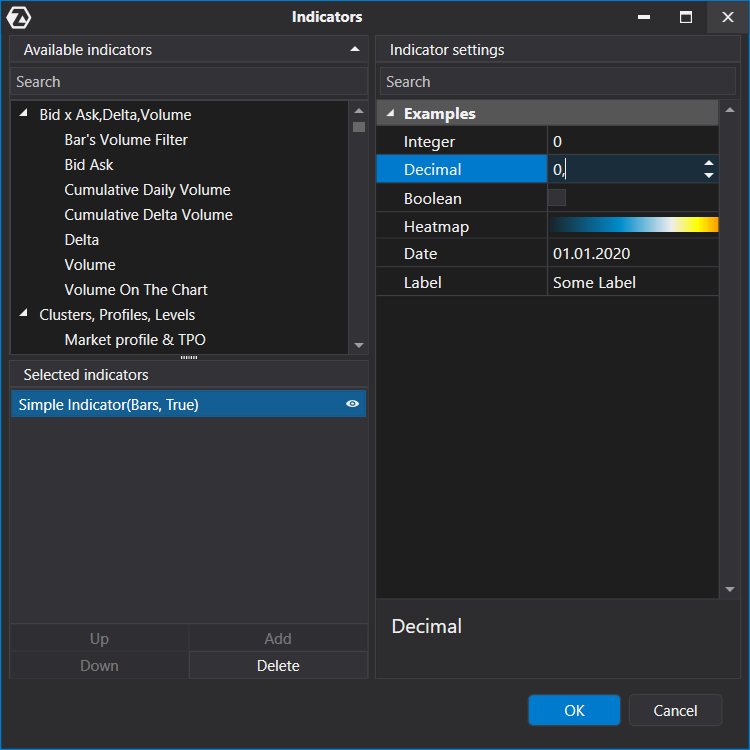
The color of a setting is System.Windows.Media.Color (the drawing API takes System.Drawing.Color; the Convert()
extension method of ATAS.Indicators converts one to the other).
Filters
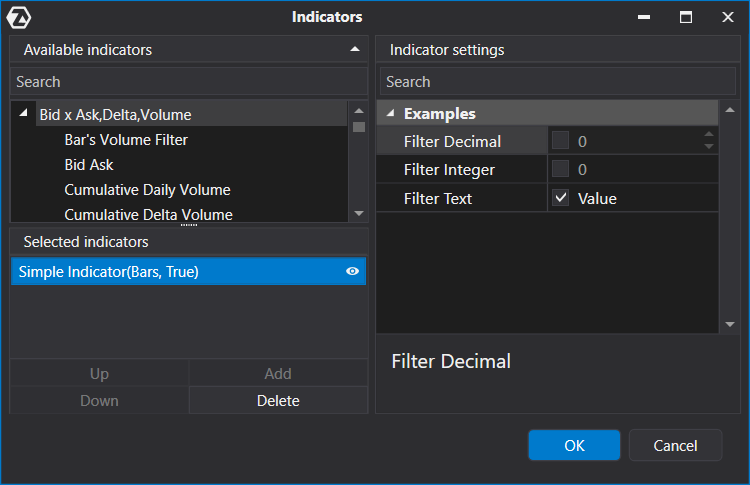
A Filter is a value with an Enabled check box: one setting both stores the value and
switches it on and off. Besides Filter (a decimal), there are FilterInt,
FilterString, FilterBool, FilterColor,
FilterTimeSpan, FilterKey, FilterRangeInt, FilterRenderPen and FilterEnum<TEnum>. Initialize the property at
once. The filter raises PropertyChanged when its
value or its check box changes; instead of subscribing, a handler of the new value can be passed to ValueOnChanged.
SetValueSilently changes the value without raising the event and without calling that handler. Passing false to
the constructor (new FilterInt(false)) hides the check box.
using System.ComponentModel;
using System.ComponentModel.DataAnnotations;

using ATAS.Indicators;

namespace ATAS.Docs.Samples.CommonApi;

public class FilterSettingsIndicator : Indicator
{
    [Display(Name = "Filter Decimal", GroupName = "Examples")]
    public Filter FilterDecimal { get; set; } = new();

    [Display(Name = "Filter Integer", GroupName = "Examples")]
    public FilterInt FilterInt { get; set; } = new();

    [Display(Name = "Filter Text", GroupName = "Examples")]
    public FilterString FilterText { get; set; } = new() { Enabled = true, Value = "Value" };

    public FilterSettingsIndicator() : base(true)
    {
        DenyToChangePanel = true;
        DataSeries[0].IsHidden = true;

        FilterDecimal.PropertyChanged += OnFilterPropertyChanged;
        FilterInt.PropertyChanged += OnFilterPropertyChanged;
        FilterText.PropertyChanged += OnFilterPropertyChanged;
    }

    protected override void OnCalculate(int bar, decimal value)
    {
    }

    private void OnFilterPropertyChanged(object? sender, PropertyChangedEventArgs e)
    {
        RecalculateValues();
    }
}
Collections
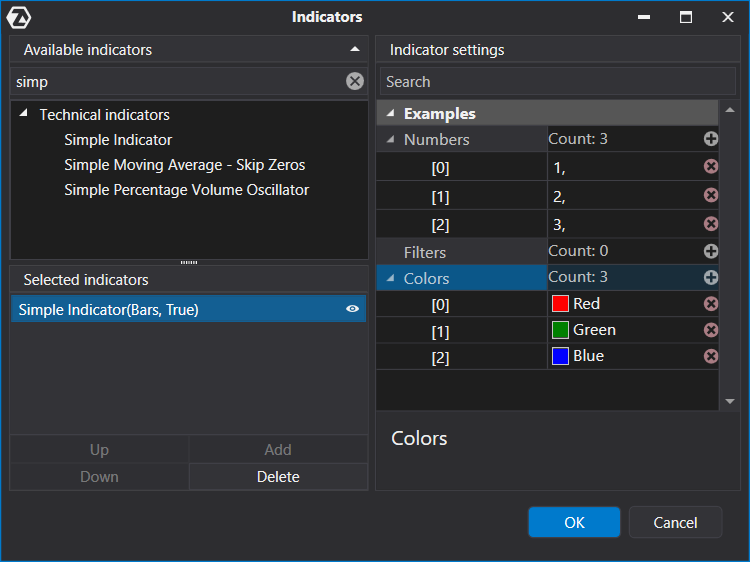
A collection setting is an ObservableCollection<T>; the user adds and removes elements in the settings window. For
the collection to be saved and restored correctly, mark it with [JsonProperty(ObjectCreationHandling = Replace)]
of Newtonsoft.Json (the platform ships the library; reference the Newtonsoft.Json package with
ExcludeAssets="runtime", so that your build does not carry its own copy).
using System.Collections.ObjectModel;
using System.ComponentModel.DataAnnotations;
using System.Windows.Media;

using ATAS.Indicators;
using Newtonsoft.Json;

namespace ATAS.Docs.Samples.CommonApi;

public class CollectionSettingsIndicator : Indicator
{
    [Display(Name = "Numbers", GroupName = "Examples")]
    [JsonProperty(ObjectCreationHandling = ObjectCreationHandling.Replace)]
    public ObservableCollection<decimal> Numbers { get; set; } = new() { 1.0m, 2.0m, 3.0m };

    [Display(Name = "Filters", GroupName = "Examples")]
    [JsonProperty(ObjectCreationHandling = ObjectCreationHandling.Replace)]
    public ObservableCollection<Filter> Filters { get; set; } = new();

    [Display(Name = "Colors", GroupName = "Examples")]
    [JsonProperty(ObjectCreationHandling = ObjectCreationHandling.Replace)]
    public ObservableCollection<Color> ColorsSource { get; set; } = new() { Colors.Red, Colors.Green, Colors.Blue };

    public CollectionSettingsIndicator() : base(true)
    {
        DenyToChangePanel = true;
        DataSeries[0].IsHidden = true;
    }

    protected override void OnCalculate(int bar, decimal value)
    {
    }
}
Editors and validation
Attributes refine how a setting is edited; the Attribute suffix of their names can be dropped.
- NumericEditor: the minimum, the maximum, the step and the display format of a number.
- ComboBoxEditor: a drop-down list; the items come from a collection type, with the members to display and to store.
[Display(Name = "Selector", GroupName = "Examples")]
[ComboBoxEditor(typeof(EntitiesSource), DisplayMember = nameof(Entity.Name), ValueMember = nameof(Entity.Value))]
public int? Selector { get; set; }

[Display(Name = "Decimal", GroupName = "Examples")]
[NumericEditor(0.0, 100.0, Step = 0.5, DisplayFormat = "F2")]
public decimal Decimal { get; set; }
[Range]and[DisplayFormat](System.ComponentModel.DataAnnotations): the allowed range and the format of a number.
[Display(Name = "Range", GroupName = "Examples")]
[Range(-100, 100)]
[DisplayFormat(DataFormatString = "##0.0##")]
public decimal RangeValue { get; set; }
[RegularExpression]: the value must match the expression. Mask: the editor accepts only input that matches the mask.
[Display(Name = "E-mail", GroupName = "Examples")]
[RegularExpression(@"^([\w\.\-]+)@([\w\-]+)((\.(\w){2,3})+)$")]
public string Email { get; set; } = "";

[Display(Name = "Time Span", GroupName = "Examples")]
[Mask(MaskTypes.DateTimeAdvancingCaret, "HH:mm:ss")]
public TimeSpan TimeSpan { get; set; } = new(1, 0, 0);
[Browsable(false)](System.ComponentModel) hides a public property from the settings window.
[Browsable(false)]
public int NoBrowsable { get; set; }
More attributes: VisibleWhen, EnabledWhen and Tab in OFT.Attributes; IsExpanded, TextEditor, SelectFileEditor and SoundComboBoxEditor in OFT.Attributes.Editors. The SampleProperties indicator shows several of them. A chart indicator can also expand and collapse its groups from code: Collapsing settings categories.